My Homelab — How It's All Grouped
A 19" rack running Proxmox for virtualisation, Kubernetes for home apps, Docker for supporting infrastructure, ARM nodes for always-on low-power workloads, and Omada SDN for no-nonsense networking. Everything runs on solar.
My Homelab — Hardware, Architecture, and Why It's Built This Way
A homelab doesn't have to start with a plan. Mine started with one raspberry pi, one purpose, and curiosity. Over time it grew into something with actual structure — distinct compute, networking, storage, and always-on tiers, each with a clear responsibility. This post is about that structure: the hardware, the architecture decisions, and the apps that make it worth running.
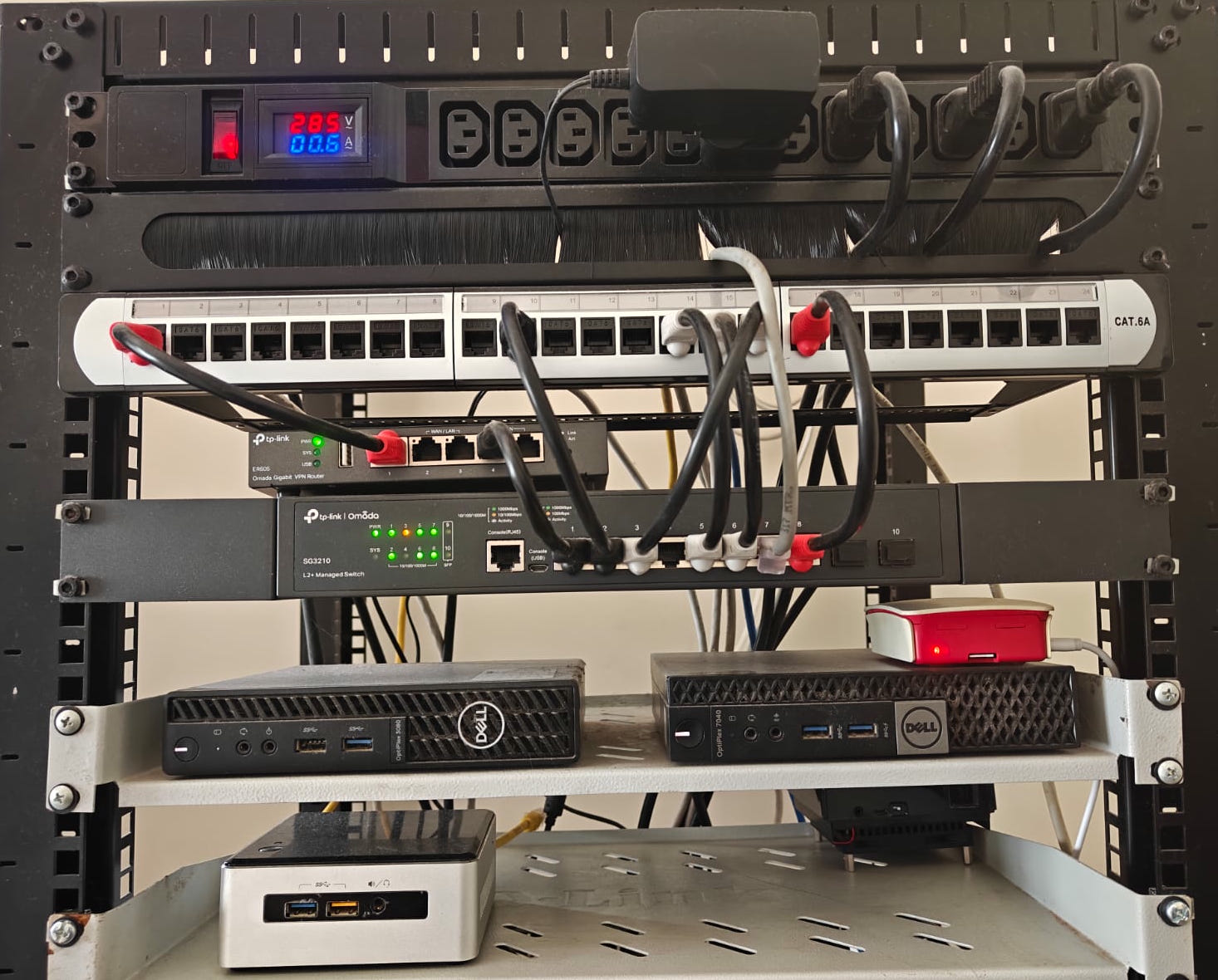
Table of Contents
- The Rack
- Compute — Proxmox and Docker as Separate Layers
- The Apps — What the Lab Actually Does
- ARM Nodes — The Always-On Tier
- Omada SDN — Network That Stays Out of the Way
- Storage — Enough Layers to Sleep at Night
- Why It's Built This Way
The Rack
Everything lives in a 19" open-frame rack — compact, low power, and surprisingly quiet. A PDU at the top powers the whole lab backed by an ups. The patch panel consolidates all runs. The network gear sits in the middle. Compute sits at the bottom.
The whole Homelab is powered by a solar system. Power efficiency isn't an afterthought here — it's a design constraint.
Proxmox VE / Docker Host rule: 32GB+ RAM qualifies a node for PVE role.
Naming Convention: proxmox nodes, vms get named with serial numbers ex: pve1, k8s2, hive3
PVE Nodes (Proxmox 8)
| Host | Hardware | RAM | Storage | Status |
|---|---|---|---|---|
| pve | Dell Optiplex 7040 Micro, i5-6500T | 40GB (32+8) | 256GB OS, 512GB NVMe | secondary compute node |
| pve2 | Dell Optiplex 3080 Micro, i3-10300T | 40GB (32+8) | 256GB OS, 2TB NVMe (SMB enabled) | Primary PVE node |
Docker Hosts/Pi
| Host | Hardware | RAM | Role |
|---|---|---|---|
| core | Lenovo M920Q, i5-8500T | 16GB | Core stack docker host |
| nuc | Intel NUC5, i3-5205U | 16GB DDR3L | storage node |
| odroid | Odroid N2+ | 4GB | Lightweight docker host |
| pi | Raspberry pi 2b | 1GB | pihole-debian based |
Compute — Proxmox and Docker as Separate Layers
The compute tier is split into two distinct layers: Proxmox for virtualisation and Kubernetes, Docker for the supporting infrastructure. This separation is intentional.
Proxmox (pve, pve2) is the hypervisor layer. It runs the Kubernetes cluster as VMs — giving each node clean isolation, snapshotting, and the ability to live-migrate or restore from backup without touching the application layer. If a k8s node misbehaves, Proxmox contains it. Not everything needs to be a VM, but the things that run production workloads do. I do run few lxc and they serve their purpose well.
core is the main Docker host — a separate machine running the supporting stack that the rest of the lab depends on. Gitea for source control and CI, Grafana and the LGTM observability stack, Minio for object storage, Traefik for ingress, and Proxmox Backup Server for VM snapshots. These are the plumbing apps — they don't need Kubernetes overhead, they need to be reliable and easy to recover. Docker Compose and a runbook is the right tool here.
The Apps — What the Lab Actually Does
Pi-hole: The Most Used App We Can’t Live Without
Honestly, Pi-hole has become the MVP of our household. Running 24/7 on a humble Raspberry Pi 2B, it handles DNS for the entire house like a champ. The kids? They’re loving ad-free Android gaming without those annoying interruptions. It’s like giving them a smoother, cleaner experience that they actually notice and appreciate.
As for me, browsing feels faster because websites aren’t bogged down loading ads—though some sites like MakeUseOf and How-To Geek do throw a little tantrum when ads don’t show up. Still, the speed boost is undeniable.
At this point, Pi-hole isn’t just another app; it’s hands down the most used app in our home. I honestly can’t imagine living without it anymore.
Jellyfin is the media server. Smart TVs across the house stream from it. It's the most-used service on the entire network — the one that gets noticed immediately if it goes down. Running it on k8s means it gets proper resource scheduling, persistent storage, and automatic restart.
Immich handles photo and video backup from Android phones. Every photo taken in the house lands here automatically. It replaces Google Photos for the household — on-premise, no subscription, no data leaving the network.
Vaultwarden is the password manager backend, compatible with all Bitwarden clients. Every device in the house uses it.
These three apps are the reason the lab exists. Everything else — the observability stack, the ingress, the backups, the CI pipelines — exists to keep these apps running reliably.
ARM Nodes — The Always-On Tier
The Raspberry Pi and Odroid N2+ are the quiet backbone of the lab. Low power, fanless, always running. They hold the lab up while everything else can be restarted, rebuilt, or migrated.
The Raspberry Pi does exactly one thing: DNS. It runs Pihole, resolving every hostname on every subnet — local services, ad-blocking for the whole network, and the mapping that point to Traefik without touching a hosts file. Single responsibility means fewer failure modes. The Pi runs 24/7 and barely registers on the power meter.
The Odroid N2+ carries the lightweight always-on workloads — n8n for automations, ntfy for push notifications, and Uptime Kuma watching the health of everything else. These are the kinds of services that need to be up even when you're restarting the main cluster. Putting them on a separate low-power ARM machine keeps them out of the blast radius.
ARM nodes aren't exciting. That's the point.
Omada SDN — Network That Stays Out of the Way
The network runs on TP-Link Omada — an ER605 router and SG3210 managed switch, both under a single SDN controller. It sits in an interesting middle ground: more capable than consumer gear, but nowhere near the complexity of full open-source solutions.
That's a deliberate choice. Omada is close to plug-and-play — VLANs, inter-subnet routing all configure through a clean web UI with no CLI required unless you want it. The SDN controller gives a single pane of glass for the whole network without a steep learning curve or fragile config files. For a homelab, the right amount of control is enough control. Omada hits that mark.
The network is segmented into three subnets. The homelab subnet keeps VMs and containers isolated from the WiFi subnet where phones, laptops, TVs, and smart home devices live. The admin subnet handles management interfaces. Traffic between subnets goes through the router — nothing on WiFi can reach a homelab service unless it's explicitly allowed, and nothing in the lab is exposed to the internet directly.
Internal hostnames resolve through Pihole, which points services at Traefik, which handles TLS and routing to the right container. The outside world sees only Cloudflare — this site included.
Storage — Enough Layers to Sleep at Night
Storage follows the same tiered logic as compute. VM disks live on fast NVMe on the Proxmox nodes. Application data lives on a 2TB HDD through Minio — object storage that the observability stack and other apps write to. Restic runs nightly backups of Docker host data on a systemd timer.
None of this is over-engineered. It's the minimum needed to recover from a failure without losing data or spending a weekend rebuilding from scratch.
Storage is going through a major change right now. will get updates soon.
Why It's Built This Way
The architecture reflects a few principles that have held up over time. Hardware earns its role — a machine doesn't get a new responsibility until it has the headroom to handle it. Separation of concerns makes things recoverable — when the k8s cluster has a bad day, the DNS still works, the backups still run, and the observability stack still shows what happened. And low-power always-on nodes are worth more than their spec sheets suggest — the Pi and the Odroid cost almost nothing to run and their uptime is what lets everything else be restartable.
The rack looks calm. Most of the time, it is.